
How to Use Emotes in Palworld: A Complete Guide to Expressing Yourself
Master Palworld emotes and expressions with our ultimate guide—unlock seamless, fun communication for PC and console players in 2026!
In the vibrant and ever-evolving world of Palworld, communication extends beyond mere words. While voice chat and text messages are available, sometimes you just want to express a feeling or reaction with a simple gesture—a universal language understood by all. The emote feature, no longer a novelty but a staple in modern gaming, serves as a fantastic tool for player interaction, especially for those who are microphone-shy or just feeling too lazy to type. Whether you're beckoning a friend, celebrating a victory with a dance, or simply sitting down to take in the scenery, mastering emotes adds a whole new layer of immersion and fun to your Palworld adventures in 2026. Let's dive into the nitty-gritty of how to bring your character's expressions to life.
🎮 Using Emotes on PC (Keyboard & Mouse)
For PC players, activating an emote is a piece of cake. The process is intuitive and follows a simple wheel-based system. Here's your step-by-step guide:
-
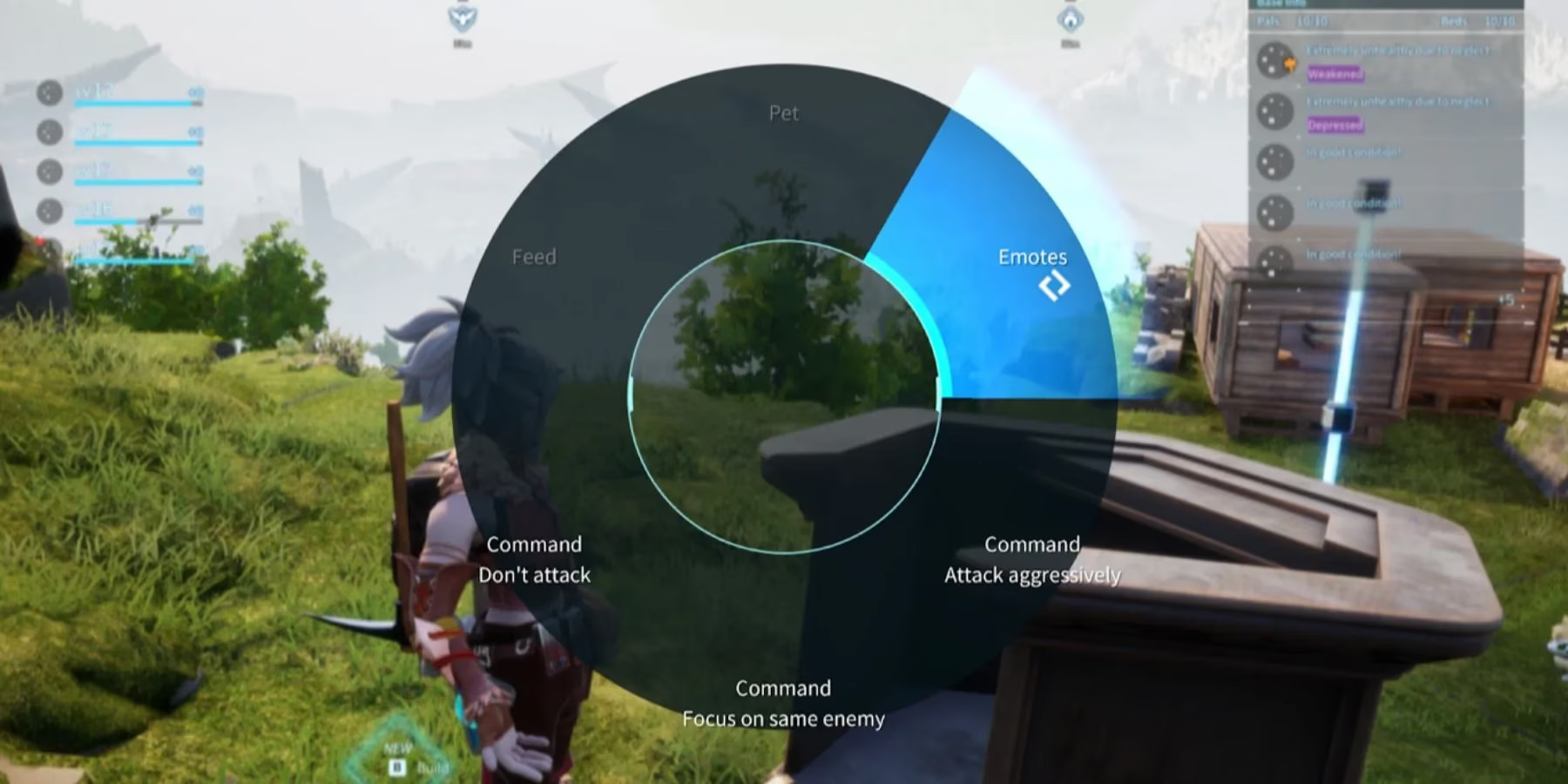
Open the Action Wheel: Press the
4key on your keyboard. This brings up a radial menu filled with various quick actions. -
Select 'Emote': Look at the upper right section of the wheel. You'll find an option clearly labeled Emote. Click on it.
-
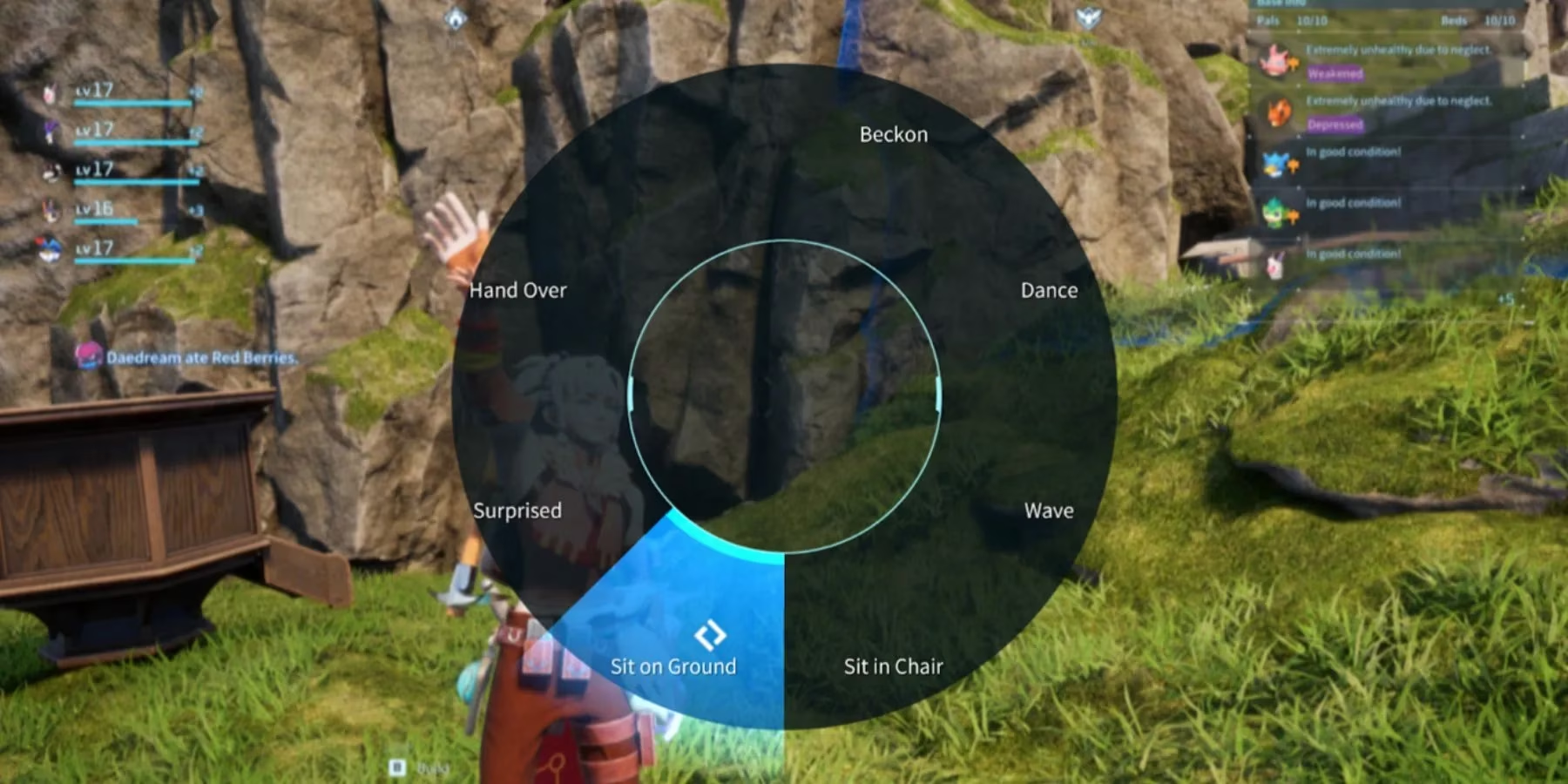
Choose Your Expression: This action opens a secondary wheel dedicated solely to emotes. Here, you'll see all available expressions.
-
Perform the Emote: Simply click on the emote you wish to perform. Your character will immediately execute the chosen animation.
It's as easy as that! This system allows for quick, non-verbal communication in the heat of the moment, whether you're coordinating with pals or just goofing around.
🎮 Using Emotes on Console (Gamepad)
Console players, fear not! The process is virtually identical and just as straightforward. The main difference lies in the initial input.
-
Open the Action Wheel: Press down on the Right Analog Stick (R3). This performs the same function as pressing '4' on a keyboard.
-
Navigate to 'Emote': Once the wheel is open, use your analog stick to highlight the Emote option, still located in the upper right quadrant, and press the confirm button to select it.
-
Pick and Perform: The emote wheel will appear. Navigate to your desired expression and confirm your selection to watch your character emote.
So, whether you're team PC or team console, expressing yourself is a seamless experience. No more fumbling for the right key or button!
📜 The Complete Palworld Emote Roster (2026 Edition)
As of 2026, Palworld offers players a curated set of seven distinct emotes. While the developers are always cooking up new content for future updates, this is the current lineup for expressing your in-game persona. Each emote has its own unique flair and situational use.
| Emote Name | Description & Best Use Case | Vibe Check 😎 |
|---|---|---|
| Beckon | Your character waves their arms and shouts, perfect for getting a distant teammate's attention. | "Hey you, over here!" |
| Hand Over | Your character extends a hand with an open palm. Great for role-playing trades or offering help. | "I come in peace." / "Need this?" |
| Dance | Your character performs a handstand on the ground and spins around. The ultimate victory or celebration move. | "Let's party!" 🕺 |
| Surprised | Your character gasps audibly and takes a step back with a shocked expression. Ideal for reacting to jump scares or unexpected events. | "OMG!" / "No way!" |
| Wave | A simple, friendly wave of the arm back and forth. The standard greeting for passersby or allies. | "Hello there!" 👋 |
| Sit on Ground | Your character sits down directly on the ground at your current location. Perfect for resting or having a casual chat. | "Just chillin'." |
| Sit in Chair | Your character assumes a squatting position. Pro Tip: Use this specifically when near chairs or benches for a natural seated pose; otherwise, you'll just be squatting mid-air! | "Time for a break." |
💡 Pro Tips and Etiquette for Emoting Like a Boss
Using emotes effectively is an art form. Here are some tips to level up your non-verbal communication game in Palworld:
-
Context is King: A
Danceemote after defeating a tough Alpha Pal is a flex. Using it in the middle of a stealth mission? Not so much. Read the room! -
The Power of
Sit in Chair: Don't sleep on this emote! It's the key to immersive role-play. Find a tavern, a campfire bench, or your own base's furniture and use this emote to sit down naturally. It beats floating awkwardly any day. -
Combination Plays: Quick successive emotes can tell a story. Try
Surprisedfollowed byDanceto show a happy shock, orWavethenSit on Groundfor a relaxed greeting. -
Universal Language: In a server with international players, a friendly
Waveor celebratoryDancetranscends language barriers. It's a great way to build camaraderie.
While the core method of accessing emotes has remained wonderfully consistent, the world of Palworld is always expanding. Who knows? Future updates might introduce even more expressive options, from angry stomps to triumphant poses. But for now, these seven emotes provide a solid and fun foundation for all your in-game interactions. So go ahead, press that button, spin that wheel, and let your character do the talking. After all, sometimes an action really does speak louder than words.